
Showing posts with label cell phones. Show all posts
Showing posts with label cell phones. Show all posts

There
comes a point where most mobile phone owners consider moving to a different
network. Thanks to the industry developing very quickly there are new deals and
tariffs coming out all the time there are many reasons to consider changing
your provider. It is a good thing to have so many deals to choose from and it
is a customer’s market. If you find a better deal with one provider then your
existing network might even offer to match it, so you are in a good negotiating
position. What
are the benefits of switching networks? Here we discuss the pros and cons of
switching networks to get a better phone deal.
Do Your Research
It is
a good idea to read a few reviews on the various networks. Some people may be
happy with features such as the customer service while others may not and it
can help to give a balanced view, although it should be remembered that
everyone has a different experience with their mobile phone company.
Shop Around
When
your contract is up for renewal, shop around to see what the deals are at the
moment. There may be incentives for new customers such as a half price contract
for several months or additional free texts and minutes. Handsets are often
available free of charge or at a much lower rate than if you were to simply go
out and buy it. Research is essential and the internet can tell you more or
less everything that you need to know from reviews on the handsets to the
details of all the deals that are around.
Who Do You Call?
Before
changing your network you should check to see if your friends are on the same
network. If you are on different networks you could all end up paying more to
make calls to each other as these might not be included in your allowance of
free minutes.
Contract Length
Make
sure too that you are not in the middle of an existing contract as you could
end up paying more to your existing provider if they do allow you to switch.
Always opt for a shorter contract length if you believe that you will want to
switch at some point. You do not save anything by leaving your contract early
as the contract costs will still need to be met.
The Switching Process
The
actual process of switching your network is fairly easy. You simply speak to
the new network and they will deal with it for you if you want to keep your
existing number. If you are not bothered about keeping the number you just
cancel your existing contract and start a new one with a new SIM and phone.
Think Carefully
Do
not simply change because the provider is offering the latest handset. If that
handset has top features such as music player that you will not use and a
camera that will only get used once in a blue moon then it might not be the
right one for you.

If a
phone comes with 100 free minutes and 1000 free texts each month this is only a
good deal for you if you are going to use them. This is not the best option for
someone who rarely sends a text message.
Make
sure the deal you get is the deal you need before you switch provider.
Negotiate
Talk
to your current network when you find a deal that appeal to you because they
might beat it in their eagerness to keep you as a customer.
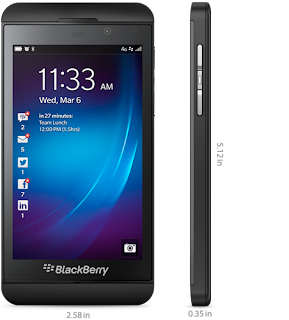
The
Blackberry Z10 looks good and certainly is a better phone than many in the
past. It is a full touch screen phone that looks very much like the iPhone
black model. It has the Blackberry name proudly emblazoned on the bottom and a
nice Blackberry emblem on the back. It comes with a 4.2 inch HD display with a
very decent 8 megapixel camera. In the past, the camera has been a weakness for
Blackberry but this camera belies that. The company certainly picked up their
game and produced a decent phone.
So
how does the phone do compared to other devices in the market and how does the
operating system stack up against Windows, Android, and iOS?
The
Positives
The
phone comes with a superb screen. The 4.2 inches look great, the colors are
deep, the contrasts are good, and the viewing angles are superb. Certainly, it
is the best screens ever to be on a Blackberry.
The
user interface through the Blackberry 10 operating system is very intuitive. It
is easy to get around. There are a few gaps that you will find when it comes to
navigating and it takes a bit of time to learn the process of getting around.
But it looks good, the icons are crisp and attractive, and overall, it’s a good
user experience.
The
camera is extremely good in good light conditions. It is a massive step forward
in terms of quality of camera on a Blackberry phone – a previous negative. The
hub system used on the Blackberry operating system also brings the interface
alive extremely well. Overall, the journey through the Blackberry phone is
good, the feel is premium and ergonomic, and it stacks up very well against the
competition; and it is Blackberry.
The
Negatives
The
phone has a very poor battery life, which is quite a negative when it comes to
this phone as it will likely be coveted by business users. There is some
bugginess every now and again in the phone operating system, which can be
rather annoying.
In
poor light conditions the camera doesn’t perform very well compared to rivals
in the industry. This is something that will surely have to get sorted out in
future releases.
The
design is nice, but nothing too extravagant or innovative. They’ve modeled the
slab on the iPhone. But then, I guess we couldn’t expect a massive innovation
for such a crucial release to the market. They have gone tried and tested,
while being innovative and creative on the interface.
Overall
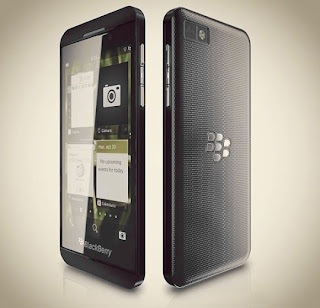
Overall,
the phone is a decent phone and a nice platform for the first release of the
Blackberry 10 operating system. The operating system does well; there is still
progress to be made both on the handset and the operating system, but with both
signs are positive that Blackberry are going to move forward. This will be more
popular with both consumers and businesses than most previous releases and the
full touch screen is great.
The
phone comes in at a rather expensive £550, and so it is a very top-end phone,
but it is a very good phone too. I would probably wait for more improvement
before I shelled out this fortune on a phone that is in essence a work in
progress.
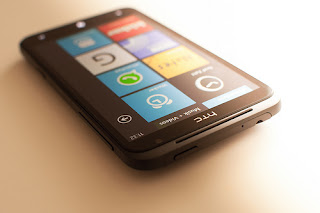
Taking delivery of a new mobile phone
is exciting. The phone arrives and you eagerly open the box so you can charge
up the battery and start accessing all of the features. In fact it probably
feels like Christmas has come early, but before you get too carried away, it is
a good idea to take your time and find out more about your new HTC Titan, because
it undoubtedly has a lot more features than you may be aware of.
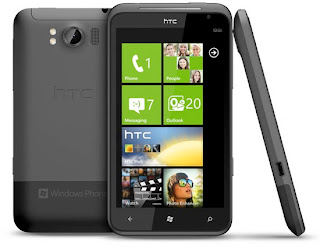
Tile System
The HTC Titan comes fully kitted out
with a Windows 7.5 Mango operating system (although this has recently been
upgraded to Windows 7.8). Unlike Android HTC phones, the visual display on the
Titan has a series of tiles that allow the user to access different functions.
For those who are used to the ubiquitous iPhone or android phones currently
freely available everywhere, the Windows tile system is a bit different. But
fear not because once you get your head around how it works, it really is
pretty easy.
Customise The Home Screen
The beauty of android phones is that
you can customise your home screen in a million different ways. Download new
screensavers and move your apps around to your heart’s content - there are so
many ways to change the look of an android phone that you can look forward to
enjoying a whole new screen every day if you feel like it. The tile system on
the HTC Titan is a lot more restrictive, but if you want a different look, it
is possible to move tiles around and change colour schemes. Sadly you can’t
redecorate with some new wallpaper like you can with android phones, but you
can shuffle tiles around if you choose.
App Happy
The HTC Titan comes with lots of apps,
which you can toggle between. The tiles on the home screen link to different
functions, including mail, news and anything else that you feel is important
enough to need direct access. The contacts section has been renamed as ‘people’
and when you go into your address book you are given several different contact
options. So if you want to get in touch with your best mate, you can call,
text, tweet, or Facebook them - the choice is yours.
Find The Right Contract
Like any of the more expensive mobile
phones out there, you may find that the only way you can afford to invest in
one is to pay for it monthly on a contract basis. If you do have the cash up
front, you should be able to buy the HTC Titan without a SIM and just insert
your existing SIM card. Or you could opt for a HTC Titan on a PAYG basis, but
before you take either of the latter two options, consider how much you
normally spend on calls, text messaging and data per month, as in many cases it
will be cheaper to opt for one of the cheaper contracts on offer. If in doubt,
pop along to your nearest phone store and ask for some advice or check online
for the latest deals.

Overview to Nokia 6500 Slide
Nokia is a popular mobile phone manufacturer who is known for putting out mobile devices that are durable and reliable, from advanced smartphones to more basic models like the Nokia 6500 Slide. If you are looking for a mobile phone that will keep you connected to the internet, your email, and all of your social media pages with powerful 3G speeds, the Nokia 6500 Slide is definitely an option.
However, if you are expecting the Nokia
6500 Slide to be your typical high-end smartphone, like the Samsung Galaxy
models or the Apple iPhones that are regularly released, you may be very
disappointed to find that this mobile phone is actually very much like the
mobile phones of old, with a keypad that is used for making calls and sending
messages and a D-pad used for navigating the interface and websites in place of
an advanced touchscreen.
Below are some other features found on
the Nokia 6500 Slide so that you can get to know this mobile phone’s features
better in order to determine if it’s the right phone for you.
The Keypad on the Nokia 6500 Slide
In order to access the basic, yet
responsive, keypad on the Nokia 6500 Slide, you have to slide the face of this
mobile phone upward. The keys are large, which is great for those who have
trouble dialling and texting on small keys and touchscreens, and the action of
moving the face of the Nokia 6500 Slide up and back down is very smooth as
well.
Sockets on the Nokia 6500 Slide
Connecting your Nokia 6500 Slide to
your computer is easy, thanks to sockets found on the top of this phone. A
micro USB port allows you to connect your phone to your computer so that you
can transfer data to and from your Nokia 6500 Slide, whether you want to share
photos, videos, or music between the devices.

You also have a 2.5mm socket that’s
used for connecting the Nokia 6500 Slide to headphones for listening to the
music player or the FM radio, or you can even use this socket to connect your
mobile phone to your television instead. This feature is especially fun for
times when you want to display your mobile phone’s videos and photos on the big
screen for family and friends to view. You can also do everything from play
games to visit websites because everything that you do on your phone is
projected onto your television’s screen. And, as a bonus, because the Nokia
6500 Slide can make video calls, you can even have your video calls projected
onto your TV as well.
Enjoying Music on the Nokia 6500 Slide
Use the USB cable to transfer music
from your computer to your Nokia 6500 Slide. You can play everything from MP3
and MP4 music files to AAC and WMA files, among others. And the headphones that
come with the Nokia 6500 Slide pump out great quality music so there’s no need
to upgrade if you don’t want to.
It used to be the case that
you had to buy mobile phones outright in order to benefit from the
functionality. Nowadays, mobile operators offer many ways to buy handsets and
get a monthly allowances of air time and data. These broadly fit into the
following categories: monthly contracts, pay-as-you-go, SIM free, and contract
SIMs. It can be very costly buying several phones on contract, here we look at
the 4 main ways to buy phones and air time needed for different types of user.
Monthly contracts
Monthly
contracts provide buyers with the opportunity to save money. Buyers can spread
the cost of the purchase of the handset and receive excellent value airtime,
data allowance, and text messages in return for a commitment to a monthly
contract. These contracts tend to nowadays be 24 months, although it is
possible to get contracts of 18 and 12 months.
A
mobile operator will normally credit check the buyer and decide whether they
are worthy of the phone they are looking for. Handsets are a significant
purchase of often £400 or more. Contracts of 24 months sometimes weigh in at
£800 or more. Therefore, the operators will want to now that the buyer is a
responsible borrower.
There
are specific types of contracts that are designed to different types of users,
from light users, medium users, heavy users, and even business users. Orange,
Tesco and T Mobile offers change almost daily and it is essential to check
current offers.
Pay As You Go
Pay
as you go phones provide buyers with the opportunity to buy a phone that is
locked to a certain provider. They will buy air time with the phone, and then
top up as they need credit through the purchase of vouchers, or by registering
their credit or debit card to the phone.
Most
of the best phones are offered on pay as you go, and these range from £15 to
hundreds of pounds. When people are looking to buy on pay-as-you-go, they are
more conscious of the price of the phone than when buying through a contract.
With contracts, the difference between phones is normally a few pounds a month.
When paying up front for a phone, the difference between £150 and £400 is more
compelling and immediate.
SIM free phones
It is
possible to buy phones that are not locked to a network and can be used with
any sim card. These are often more expensive than pay as you go phones, but
provide the opportunity to choose your network and move between networks if you
choose. These unlocked phones are available through many high street shops, and
also online retail stores.
Contract SIMs
A new
innovation in the mobile phone market over recent years has been the
availability of sim card contracts. These provide affordable allowances of
talk, data, and texts in a stand-alone sim. The buyer will not get a phone with
the purchase, but will put the sim card into an unlocked sim free phone of
their choice. The great thing about these sim contracts is they give access to
cheap calls and data without such stringent credit requirements. After all, the
operator does not have to part with an expensive product in the form of a
premium high end phone.
In Summary
In
summary, the 4 main ways to buy phones and air time are suited to different
types of user. You should always be mindful of your budget and not get tempted
into a phone and contract above your financial capacity. It is a dangerous trap
when a household starts buying several phones on contract. It is easy to end up
with outgoings of well over £150 a month and commitments of up 24 months.
It seems that these days the
vast majority of people are in possession of a mobile phone. You may even
know one or two people that have more than one handset in operation at any one
time. At first glance it may be that phones are now an essential
part of our lives and while they have certainly made their mark, you have to
ask the question about why they are and what difference they are making.
Long, Long Ago
Mobile
phones are a relatively new addition to our lives. Back in the 1980s
a mobile phone was available but it was the size of a house brick and was a
similar weight. This could be why they took a while to catch
on! At that time some people didn’t even bother with a phone line at
home, so they were used to managing without a phone anyway.
It
has taken a while to make the phone affordable and useful for all
concerned. Thanks to the increase in manufacturing technology more
and more companies are able to produce handsets that appeal to a variety of
people. However, just because they are now more affordable and accessible
it does not mean that you actually need a mobile phone. You want one rather
than need it.
Need or Want?
It
can be very difficult to do without your phone when everyone around you has
one. Keeping in touch with friends and family is far easier when
everyone has a mobile phone as you can reach them at any time no matter where
you are. It certainly does make sense to have one from a
personal safety point of view. If you regularly drive long distances
it can provide peace of mind to know that you have the means to get help if you
need it. Twenty years ago if your car broke down in the middle of
nowhere you either stayed with it and hoped that someone stopped to help or you
walked until you found a phone.
It is
also worth noting that the number of public call boxes has been dramatically
reduced. This is because so many people have mobile phones that they
are not used as much as they used to be but the downside is that in order to be
sure you can make a call you need to have a mobile phone as there is no
guarantee that you will find a payphone.
3G Internet Access

You could try living without
a mobile phone although you may find it hard to do that given society’s
reliance on them today. Keeping in touch is now easier and running
one costs nowhere near what it used to so it would be a shame not to make the
most of all the advantages that they offer.

When you first get a mobile phone you may not be aware but you can actually choose your own number.
When you sign your contract with your
service provider you can actually request an easy to remember number. There are
no guarantees that you will get the exact number you want, but the service
provider will have a list of available numbers that you will be able to choose from.
If you need a number that a child or an elderly relative will find easy to
remember then make sure you ask for this when you sign your contract. If you do
not then you will be given a random mobile phone number that might be harder to
remember.
Consecutive Numbers
If there are a few of you in the family
buying handsets together then it is possible to get consecutive numbers which
will make remembering the numbers all that more easier. This is particularly
useful for those who are running a family business. Not only will family find
the consecutive numbers useful so will clients and potential new customers. It
can help to keep your business running smoothly and your clients can easily get
in touch with you.
Business Options
Business users may be able to ask for a
number that spells out their name. This is popular in America but not done
quite so much in the UK. Those letters on the number keypad are not just there
for texting. They can also be used to help people remember your number, which
is easier if the number spells out a word. For example 254637 spells out the
word BLINDS, an ideal number if you are in the window dressing business.
If you request a certain number for
this reason, be sure to tell your network provider why you want it. They may be
more inclined to free it up for you if they know it is for business reasons.
Keeping business customers happy can mean bigger business for them in the
future.
Personal Reasons to Choose Your Own Number
A mobile phone number is unique to you.
You may not even realise it at the time but your mobile phone number will
actually become part of your identity. Friends will see your number flash up on
their phone and know it is you. They do not need to see your face, or see your
name on the display; the number is all they need to see to know who they are
going to be talking to.
Network Transfers
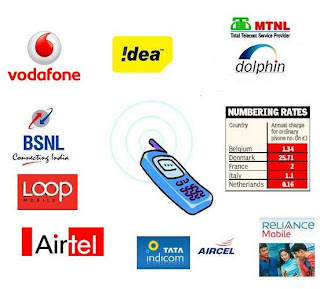 If you have a number that is important
to you, but you decide the time has come to change your network provider, don’t
let the fact you might lose your number put you off. Your number can be taken
with you to whichever network you decide you want to sign up with.
If you have a number that is important
to you, but you decide the time has come to change your network provider, don’t
let the fact you might lose your number put you off. Your number can be taken
with you to whichever network you decide you want to sign up with.
The process is very quick and fairly
painless and it means, particularly for business users, that there is no need
to let everyone know a new number, there is no need to change business cards
and company letterheads and there is no need to have friends and family try to
remember a brand new number. Porting is much easier all round.
Just about every phone is going to have
people who don’t really love it as much as others do. This can be said about
just about everything, and this really isn’t any different when we’re talking
about mobiles. Motorola has been a company that has received a good amount of
bad press over the years, though things have been turning around with all of
their work with Google. Their Razor is one that has been the target of some
critics out there, and there have been a couple of things namely that the
critics have been talking about, and it’s something that we think is for good
reason.
Namely, it’s the fact that it’s rather
lacking in some efforts, and that’s a fair enough comparison, though that
doesn’t mean that it doesn’t make up in others. After all, it’s a mid-range
phone and most people are expecting for it to be a little deficient, though
that’s most definitely to be expected by a lot of people in the know. Here,
we’ll talk about a few of the things that people are generally talking about.
It’s Lacking Some Things
First and foremost, people are going to
talk about the fact that it doesn’t have a high definition screen. We’ve all
been spoiled as of late; virtually all great phones have them, and this one
just doesn’t. What’s more is that this particular phone has a pretty large
screen, so you’ll most definitely notice it here. The Razor also is one that
doesn’t support 4G, which is a shame because all phones have that, too. 3G is
still okay these days, but definitely isn’t a selling point, and has turned off
more than a few people from buying it. But, those things are forgivable in some
people’s eyes, but the fact that it doesn’t support apps is another.
Where’s the Compatibility?
This is probably one of the worst
things about this phone. Android prides itself on having a boatload of apps,
and it’s not a great thing for the Razor to stand out and say, “Hey, we can’t
support this!” In fact, it’s definitely one of the reasons why this phone will
never really see that many pockets, especially when you consider the wealth of
Android-powered phones that are currently on the market, as well as those that
are currently being developed. Sure, many of the apps will work, but when
you’re buying an Android phone, you’re more or less expecting to use any app
that you’re interested in downloading. The Razor can’t fit the bill here.
Outside of those
few things, the critics really don’t harbor much ill will toward the Razor.
It’s a pretty decent phone for the price, and it’s widely available. However,
if you’re looking for a really sharp screen and all of the app capability that
you can shake a stick at, you may want to look elsewhere, as you won’t find it
in the Razor. The most troubling thing is that there are a plethora of other
great Android phones on the market that are much better suited.
These
two phones are from manufacturers with contrasting fortunes in the smartphone
market. Apple has sold millions and millions and millions of their iPhone
series, with 50 million of the iPhone 5 sold in a single quarter of 2012.
Motorola have sold around 120 million of their Razrs in three years. So, how do
these two phones stack up on display, the appearance and design, their
processors and so on. Here we compare and contrast the Motorola Razr I with the iPhone 5 to see if it is actually a better phone.
Appearance and design
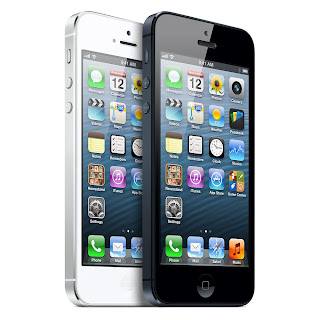
The
Apple iPhone does not diverge massively from its traditional iPhone look. They
have made it slightly taller to cope with the 4 inch screen compared to the 3.5
inch screen, but it is the same iconic look that has served Apple so well.
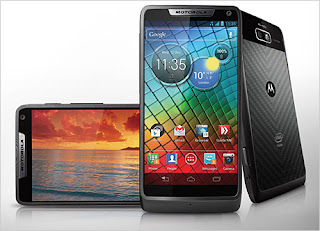
The
Motorola has again gone for a similar design to its predecessors, but it's
certainly a bit more impressive and imposing than its forbearers. It has a
display that goes almost edge to edge and is a nice looking phone. They
actually both look very similar next to each other in shape. Personally, I
prefer the iPhone and appreciate the fact that it got it right first.
Display
The
Motorola has a 4.3 inch display compared to the iPhone 5’s 4 inch. However, the
technology on the iPhone 5 is superior. It has a better pixel density and just
provides a sharper, nicer display. Therefore, on the display, I give Apple
iPhone 5 the win.
The camera
The
iPhone 5's 8 mega pixel camera is better than the Motorola's 8 megapixel
camera. It takes more consistent, better pictures and therefore takes the win.
The operating system
The
iPhone 5 runs its Apple iOS 6 platform. Motorola runs Android. Which you prefer
already dictates whether you like the Apple or the Motorola on the software
front. For me, the Android platform is still much better than the iPhone iOS 6
platform, and therefore, I would choose the Motorola on this front.
The storage and processor
The
iPhone for me has a better processor although its specifications don't look as
impressive. It has an amazing ability to get a lot out of the operating system.
It's fast, snappy, and frankly incredible. The iPhone comes with different
amounts of on-board storage including 13, 32, and 64 Gigabytes. T-Mobile, 3
Mobile, Orange, Vodafone and other networks will require pretty hefty contracts
to get the 64GB phone as it is extremely expensive.

The
Razr comes with 8 Gigabytes of on-board storage and capacity to increase using
a micro SD card. I like the fact that it has a micro SD slot. However, on the
processor and the memory, overall the iPhone wins for me.
Conclusion
For
me, the iPhone wins this battle. It is a solid and impressive phone with an
iconic design that is extremely popular in the consumer market.


 Posts
Posts



