
Showing posts with label Computer. Show all posts
Showing posts with label Computer. Show all posts

Social Media
Even if you are in a remote location, you can often head to a nearby coffee shop or other establishment to pick up an Internet connection for a while. Time zone won’t matter when posting a picture to the Facebook wall of your family members or friends to let them know how you are doing. Updating your statuses on a regular basis will make these important people feel as though they are going on parts of the journey with you, regardless of how far away they actually are.
Good Old-Fashioned Letters
Writing some good old-fashioned letters can help you to stay in touch with loved ones. If you are staying in once place long enough, you can receive them too. In the event that you do not, simply send letters to your loved ones. You can send postcards from the places that you visit, and you can all exchange pictures of the memories you are making on your own. Reading the handwritten words from a loved one and composing your own letter might be emotional enough to move the most even-keeled people to tears.
Shared Experiences
Even though you may be thousands of miles away, you can still have some shared experiences. For example, you can still go to mass on Sundays and know that your family is doing the same. Through having this connection with God, you are also connecting with your family members and friends. For those who are not religious, you could go to a particular tourist attraction while friends and family are looking at pictures of the place online. Another idea is to dine on a certain ethnic cuisine or type of food while your family is doing the same back home.
Video Chatting
While video chatting is never going to be exactly the same as spending time with individuals in person, at least you are able to see one another. When staying in a hotel during your journeys, set up a video chat with your family and friends. You especially want to try to do this if you are away during a holiday. Of course, constantly chatting in this scenario is probably going to be difficult, especially if you do not always have an Internet connection. Therefore, you can save this for special moments.
Sending Mementos

Being away from the people who you love can be difficult, but it does not have to be impossible. When you employ the aforementioned methods, you are really able to connect with these people back home and continue to strengthen your bonds with them.

Consider to run the Windows updates in order to fix all the files and safety loopholes from the prior update. Though this process is quite critical to repair Windows and prevent a slow laptop or computer efficiency, a great deal of individuals don't appear to bother updating their operating program. This method can be done effortlessly. In reality, there is an alternative that will let the personal computer to automatically update and repair Windows ahead of shutting down.
Sadly, Windows updates are not adequate to safeguard your pc from virus and malware attacks. Viruses, malware, and spyware are known to be great contributors to a slow computer performance. In order to get rid of these files and totally repair Windows, you need to have to have a separate system that will manage these files.
Anti-virus and anti-spyware plans can be bought all over the Internet and having these tools will preserve your laptop or computer protected and will offer an added line of protection to stop a slow computer. This will also help you effectively repair Windows and increase the efficiency of your computer.

Most of the time, a slow laptop or computer is a result of damaging files contamination, all you have to do is to launch these safety programs and allow it scan your computer for viruses, malware, and spyware. If you managed to get a very good security application, you can get rid of these sorts of files in less than an hour.
As soon as you remove viruses, malware, and spyware from your pc utilizing safety applications, you require to execute a registry repair. You want to get rid of the roots of these files that are seeded deep in the registry of your personal computer. Having a registry repair plan will support you get rid of these files simply and automatically.
 You will notice that right after you have employed the registry repair tool with your slow personal computer, it will run a great deal more quickly compared to its speed just before the cleanup. Usually preserve in thoughts the processes that are essential in order to preserve your computer working in ideal problem. Aside from security applications, you also need a registry repair instrument that will aid you repair Windows and your pc instantly.
Update Windows, remove harmful files, and execute a registry repair are the essential actions when dealing with Computer issues. A registry repair instrument is as crucial as possessing security applications. This will aid you maintain a healthy personal computer by routinely performing a registry repair.
Is your personal computer taking also significantly time to boot up? Or do you need to have to wait lengthy time to get response from an application? Slow laptop or computer is a extremely frequent issue which all the laptop or computer customers knowledge. There are a lot of motives for which personal computers slow down above time. Lack of proper upkeep is a single of them. There may possibly be virus troubles as well. Occasionally due to operating method troubles also lessen the speed of the personal computer.
Sadly, Windows updates are not adequate to safeguard your pc from virus and malware attacks. Viruses, malware, and spyware are known to be great contributors to a slow computer performance. In order to get rid of these files and totally repair Windows, you need to have to have a separate system that will manage these files.
Anti-virus and anti-spyware plans can be bought all over the Internet and having these tools will preserve your laptop or computer protected and will offer an added line of protection to stop a slow computer. This will also help you effectively repair Windows and increase the efficiency of your computer.
As soon as you remove viruses, malware, and spyware from your pc utilizing safety applications, you require to execute a registry repair. You want to get rid of the roots of these files that are seeded deep in the registry of your personal computer. Having a registry repair plan will support you get rid of these files simply and automatically.
You will notice that right after you have employed the registry repair tool with your slow personal computer, it will run a great deal more quickly compared to its speed just before the cleanup. Usually preserve in thoughts the processes that are essential in order to preserve your computer working in ideal problem. Aside from security applications, you also need a registry repair instrument that will aid you repair Windows and your pc instantly.Update Windows, remove harmful files, and execute a registry repair are the essential actions when dealing with Computer issues. A registry repair instrument is as crucial as possessing security applications. This will aid you maintain a healthy personal computer by routinely performing a registry repair.
Is your personal computer taking also significantly time to boot up? Or do you need to have to wait lengthy time to get response from an application? Slow laptop or computer is a extremely frequent issue which all the laptop or computer customers knowledge. There are a lot of motives for which personal computers slow down above time. Lack of proper upkeep is a single of them. There may possibly be virus troubles as well. Occasionally due to operating method troubles also lessen the speed of the personal computer.

The particular
problem to speed up my laptop stays in the minds of many individuals. Having a laptop
computer is one way to increase efficiency when it comes to organizations and
businesses, education and learning and also other activities. It's common for
laptops to become slower the more when one makes use of them. That is caused by
the hardware and software factors which are easy to modify individually.
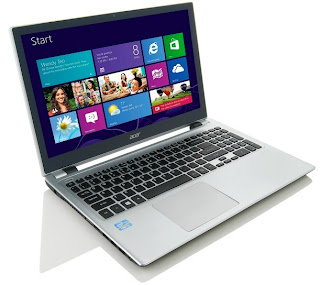
The computer systems RAM plays an important part on its own efficiency. This is the very first consideration whenever I wish to increase the speed of My Laptop. For most laptops, the Random Access Memory can be upgraded. Enhancing the Ram memory helps because it is the highest hardware factor which affects performance. Shopping for RAM for a laptop computer is significantly more cost-effective compared to seeking an upgrade from your technician or perhaps producers. Depending on the laptop company, there's a predetermined means of improving Random access memory which entails a simple process.
Speeding up the laptop may also be attained by way of ending some applications that run in your computer. Many of these applications usually are not important however operate automatically. These kinds of software programs could be terminated from the Task Manager. By pressing the particular CTRL+ALT+DEL keys, your task manager opens after which you can stop virtually all unneeded software programs.
An individual can also launch some commands in the Start menu as well as Run option when it comes to speeding up the laptop. Especially when starting up the particular laptop, there exist numerous auto loaders that need cleaning out. Autoloaders that slow down the laptop computer may be cleaned out simply by running the msconfig command then uncheck all of the unneeded apps in the Startup tab. Unnecessary programs can in addition be disabled by simply running the particular services.msc command. This is after that accompanied by clicking the particular Start Type to rearrange menu and immobilize such programs.
 Other methods to include things like reducing
its display resolution and also using an alternative browser. Such internet
browsers like Firefox as well as Google Chrome are usually a lot faster when
compared to basic Windows Explorer. There are other approaches to but these
would be the most popular and easy to employ. Replacing the particular hard
disk drive with any SSD is part of other computer hardware alternatives however
it is very expensive and reduces storage hence not suggested.
Other methods to include things like reducing
its display resolution and also using an alternative browser. Such internet
browsers like Firefox as well as Google Chrome are usually a lot faster when
compared to basic Windows Explorer. There are other approaches to but these
would be the most popular and easy to employ. Replacing the particular hard
disk drive with any SSD is part of other computer hardware alternatives however
it is very expensive and reduces storage hence not suggested.
The computer systems RAM plays an important part on its own efficiency. This is the very first consideration whenever I wish to increase the speed of My Laptop. For most laptops, the Random Access Memory can be upgraded. Enhancing the Ram memory helps because it is the highest hardware factor which affects performance. Shopping for RAM for a laptop computer is significantly more cost-effective compared to seeking an upgrade from your technician or perhaps producers. Depending on the laptop company, there's a predetermined means of improving Random access memory which entails a simple process.
Speeding up the laptop may also be attained by way of ending some applications that run in your computer. Many of these applications usually are not important however operate automatically. These kinds of software programs could be terminated from the Task Manager. By pressing the particular CTRL+ALT+DEL keys, your task manager opens after which you can stop virtually all unneeded software programs.
An individual can also launch some commands in the Start menu as well as Run option when it comes to speeding up the laptop. Especially when starting up the particular laptop, there exist numerous auto loaders that need cleaning out. Autoloaders that slow down the laptop computer may be cleaned out simply by running the msconfig command then uncheck all of the unneeded apps in the Startup tab. Unnecessary programs can in addition be disabled by simply running the particular services.msc command. This is after that accompanied by clicking the particular Start Type to rearrange menu and immobilize such programs.
 Other methods to include things like reducing
its display resolution and also using an alternative browser. Such internet
browsers like Firefox as well as Google Chrome are usually a lot faster when
compared to basic Windows Explorer. There are other approaches to but these
would be the most popular and easy to employ. Replacing the particular hard
disk drive with any SSD is part of other computer hardware alternatives however
it is very expensive and reduces storage hence not suggested.
Other methods to include things like reducing
its display resolution and also using an alternative browser. Such internet
browsers like Firefox as well as Google Chrome are usually a lot faster when
compared to basic Windows Explorer. There are other approaches to but these
would be the most popular and easy to employ. Replacing the particular hard
disk drive with any SSD is part of other computer hardware alternatives however
it is very expensive and reduces storage hence not suggested.Care tips for the computers

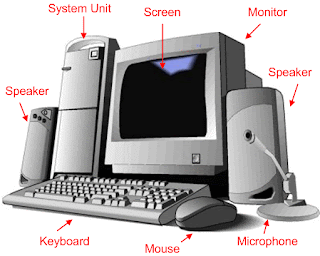
We require computers in everyday
activities. To ensure its long run, we need to take care of the computer
carefully. Here are few tips related to that:
It is highly important that
you keep the computers in a safe and dry place. Be careful about moisture and
heat. Remember that the computers should not be placed anywhere close to the
heat or water source. Often people have the habit of drinking or eating next to
the computer. Avoid doing this.
You need to regularly clean
the computer to avoid dust settling down on it. However, often people are not
aware about the right method of cleaning the computer. Make sure that you use
nothing but a static free cloth to clean the computer. There are special static
free cloth and cleaners to be used only for the computers. Use them for your
office/home PC.
Often dirt gets accumulated
on the keyboard. While it is easy to clean the dirt from the sides of the
keyboard, you can face trouble in taking out the dirt from between the keys.
The best way to clean the dirt from in between the keys is to turn the keyboard
upside down. Shake it little bit and all the dirt will automatically fall down.
If there is still dirt among the keys, then you can use compressed air.
Make sure that the
ventilation holes in the computer do not have any blockage. There should not be
any dust blocking the ventilation holes. Remember that blockage in the
ventilation hole will lead to the overheating of the computer.
Again, you can use compressed
air to remove the debris from the ventilation hole of the computer.
Make sure that your computer
is plugged in with the surge protector.
Care tips for the printers

Clean the removable parts of
the printer at first. You can use a dry clean cloth to wipe the removable parts
of the printer.
It is highly important that
you use appropriate paper size and quality in the printer. In order to do this,
read the manufacturer instructions carefully. Make sure that the paper you use
in the printer is as per the ideal size suggested in the manual.
Note: in case you are
confused with the term paper weight – it refers to the paper thickness.
When you are using the
printer, often people tend to overfill the paper tray. Do not do this. Put as
much paper sheets as required.
In case any paper sheet gets
trapped inside the printer, remove it immediately.
Be careful with the printer
ink. Use branded high quality ink like – Canon Large Format Ink. While you are refilling the ink, read the manual instructions
carefully. Carefully open the printer and remove the used ink cartridge.
If you are unable to find the
ink cartridge in the printer, use the printer's manual for instructions.
Kevin Matthews is a renowned
writer who has mainly written articles on luggage and luggage repair centre.
In this article, he shifts his focus from luggage to computer. He gives some
handy tips on computer and printer care in this write-up.
 Personal computer
technology has exploded in recent years. In the not too distant past, the
process of buying a new computer was a fairly simple, straightforward one. You
could buy desktop from a company like Dell, HP, or IBM, or if you were feeling
quirky and different, you could buy an Apple iMac. That was about it. There
were a handful of options to sort through, but ultimately a home computer was a
home computer; the most stressful choice in the process was choosing between a
black case and a white one. Things like processing power, hard drive space,
RAM, and graphics cards were largely similar across the board, and computers
all had a very “one-size-fits-all” vibe.
Personal computer
technology has exploded in recent years. In the not too distant past, the
process of buying a new computer was a fairly simple, straightforward one. You
could buy desktop from a company like Dell, HP, or IBM, or if you were feeling
quirky and different, you could buy an Apple iMac. That was about it. There
were a handful of options to sort through, but ultimately a home computer was a
home computer; the most stressful choice in the process was choosing between a
black case and a white one. Things like processing power, hard drive space,
RAM, and graphics cards were largely similar across the board, and computers
all had a very “one-size-fits-all” vibe.
Nowadays, computer
technology has become far more advanced, and far more focused. One does not
simply “buy a computer” anymore. The number of available options has grown
significantly, as has their functional capabilities. In place of the
alternative-less desktop computers from the past are devices like laptops,
tablet computers, ultra-books, and net books, all with dramatically different
specifications, and dramatically different purposes. With all these new
options, the process for buying a computer has become much more complicated,
though with the correct approach, you can be sure that what you buy is exactly
what you need.
Buying a computer today
is much the same process as buying a car. When looking into purchasing a new
vehicle, you need a clear understanding of what your needs are. An SUV does a
much different job than a truck or a small sedan. If you’ve got a family of
six, a two-seater sports car would be a complete waste. If you live alone in a
crowded, urban city with narrow streets like San Francisco, buying a large SUV
would be insane. Buying a computer works in the same way. If you do not clearly
understand what your needs are, you will end up with a product that is entirely
inefficient for your situation (and often far more complicated and expensive).
The first question to ask
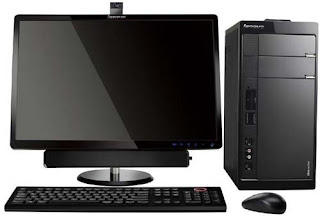
yourself is where you want your computer to be. If you need something for a
home office that has no need to be moved, a desktop computer will suffice. If
you’re a person on the go, you’ll want something more mobile like a laptop, or ultra-book.
Modern laptops carry much of the same level of capability found in a desktop,
condensed into a small space and protected against things like drops, being
stepped on, or the weather. If you need something even smaller and more mobile,
tablet PCs might be the answer, though their operating capabilities are lesser
than their most robust brethren.
With your mobility
needs sorted out, the next, and most important, question to answer is what
kinds of things you plan on doing with your new computer. A desktop computer is
the most robust option, capable of handling the most
stressful functions, like creating and editing videos or music, or web and
graphic design, though most people have no real need for this level of
capability. Laptops have similar levels of functionality at the top of the
line, though simpler versions are generally designed to handle less stressful
programs and perform fewer tasks. Small laptops like ultra-books, netbooks, or
Google’s Chromebook, have much less functionality when compared to desktops,
but still handle the kinds of tasks that most people will ever need in a
computer.
 For most people, high
end computers are relatively useless (be it a desktop or a laptop), like
purchasing a race car to drive to the store. The vast majority of people only need
a computer to handle relatively simple functions: browse the Internet, send
emails, and watch videos. These tasks do not require high end processors or
graphics cards, and purchasing a computer that has those things would be a
tremendous waste of money. Unless you have a specific need for a computer that
can handle very large, stressful programs, a simpler computer will cover
everything you need to do, and save you hundreds of dollars. It can be easy to
be swayed by savvy computer salesmen and fancy packaging, but often times the
simpler, less expensive option is the correct one.
For most people, high
end computers are relatively useless (be it a desktop or a laptop), like
purchasing a race car to drive to the store. The vast majority of people only need
a computer to handle relatively simple functions: browse the Internet, send
emails, and watch videos. These tasks do not require high end processors or
graphics cards, and purchasing a computer that has those things would be a
tremendous waste of money. Unless you have a specific need for a computer that
can handle very large, stressful programs, a simpler computer will cover
everything you need to do, and save you hundreds of dollars. It can be easy to
be swayed by savvy computer salesmen and fancy packaging, but often times the
simpler, less expensive option is the correct one.


 Posts
Posts



