
Showing posts with label iPhones. Show all posts
Showing posts with label iPhones. Show all posts

Despite there being big campaigns about the consequences of using your mobile phone while driving there are still a large number of people who take the risk, not just of being fined but of causing an accident. You can, however, use your phone while driving if you have hands-free.
You still need to be sure that you are in complete control of the vehicle though as if the police believe otherwise you can still be prosecuted for using the phone. The only time you are able to use your phone is if you need to make a call to the emergency services and it is unsafe for you to stop.
Fines can run to thousands of pounds and this does not even begin to cover the cost of any damage caused in an accident. So, here we discuss the hands free options available for your mobile phone when driving.
Hands-Free Options
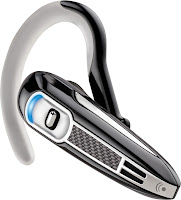
Many handsets do come with an earpiece that connects to the phone with a cord so that you can use it while driving or carrying out other tasks. The cord can sometimes be an issue as it can get in the way while driving and is not really practical, but this is the most basic of options that are available to you. To be honest they are a joke as far as a hands-free option goes.
In-Car Kits
Hands-free car kits can be fitted easily in your vehicle so that you can use them on speaker or with Bluetooth. These have an aerial included that will boost reception in areas with poor network coverage.
Parrot kits are becoming very popular and many company car drivers have had these fitted as a matter of course. This allows the phone to be used completely hands free and is far safer than trying to use a corded earpiece. This is not the cheapest option but it is a worthwhile investment if you spend a lot of time driving. Mobile phone usage is important for those in business who need to be out of the office a lot but at the same time safety needs to be paramount.

It should also be noted that many of the latest cars have control panels on the steering wheels if the car has a Bluetooth system already installed. This can make it even easier to use your phone while driving. You can accept and reject calls from the control panel and the cradle adaptor which is used can use the battery power from the car as well as the external antenna in order to reduce reliance on the mobile phone’s own battery. You do need to have a compatible phone in order for this to work but there are very few handsets which are not compatible.
Bluetooth
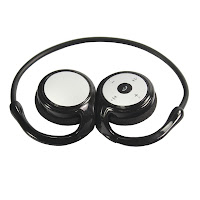 Bluetooth headsets are available for a few pounds and most mobile phones now have this technology. There is an earpiece which is cordless and easy to operate without taking your attention away from driving. Other Bluetooth devices include a speaker/mic you clip onto your shirt, handier if you wear glasses than an earpiece.
Opt for a universal model and you will find that it will still work even when you upgrade the phone to another model.
It is important not to believe that you are safe to use your handset without hands-free while you are driving. Even the most experienced drivers have been distracted this way and it has had horrific consequences.
Short Description: This article looks at the two main types of cash back deals available when purchasing your mobile phone.

Cashback deals provide mobile phone buyers with the opportunity to gain money back when they commit to a mobile phone contract. There are two main types of cashback; automatic cashback and cashback by redemption.
Automatic cashback
Automatic cash back is offered by retailers through refunds that are automatically provided back to mobile phone purchasers. These are normally offered automatically at the start of a contract and are deposited as cashback,direct into a bank account, as cash or as vouchers.
Cash back by redemption
Cashback by redemption is not automatically available to buyers. It is provided when the retailer or operator has seen that you are paying your contract monthly. There’s normally a pre-defined period that you must meet your payments and then the cashback will kick in. You may for example be given a 6-month period over which you must prove that you are paying your mobile contract on time and in full. O2, Vodafone and Three Mobile phones can all be found with this kind of deal.
Cash back deals are one of the latest incentives on the mobile phone market. They offer the opportunity to gain additional value in ones mobile purchases. It was the case a few years ago that most of the deals offered involved free gifts. For example, it was possible to get a tablet or a games console for free if you went for a contract that was valued more than the phone. For instance, if you went for a mid-tier phone but took a high-end priced contract of £30 or more, the value of the handset would not match the amount you are paying and may be incentivised by a free gift.
With recession biting and priorities changing, cashback has become more appealing and so have line rental offers. Some operators and retailers are offering half-price line rental for specified periods, perhaps 3 months or 6 months. And customers are consistently looking for value and money-saving in today’s economic climate.
What Deals In The Future?
The deals available over recent years have been nothing short of astounding. Cashback, free gifts, and line rental deals have provided the mobile consumer market some added spice.

The mobile phone sector has thrived through recession. The telecoms market is one of the few that has not had a downward trend since 2008. The phone revolution has created continuous growth in the sector. And this has meant that cash rich companies are able to be flexible in their offerings and remain competitive to entice new customers in.The incredible profitability in the sector means that companies are cash rich, and can invest upfront in customers in order to gain and retain customers over long contracts. The deals in the future are sure to be used as a means to get an edge over the competition.
Introduction to Atex Phones
 Atex
mobile phones are durable and can withstand numerous hazardous conditions, but
like any other piece of technology these special phones need to be properly
maintained. Proper maintenance goes beyond extending the life of the device; it
is vital for any intrinsically safe equipment because of the roles each device
plays in ensuring the safety of individuals exposed to hazardous environments.
The Atex Guidelines states that one of the main requirements of all Atex
equipment is that it is both safe and reliable. It is particularly important to
regularly inspect phones because they are a piece of equipment that is taken into
nearly every area and are likely to be used frequently. Regular inspections and
repairs of this type of equipment are also regulated so that employees are not
compromised.
Atex
mobile phones are durable and can withstand numerous hazardous conditions, but
like any other piece of technology these special phones need to be properly
maintained. Proper maintenance goes beyond extending the life of the device; it
is vital for any intrinsically safe equipment because of the roles each device
plays in ensuring the safety of individuals exposed to hazardous environments.
The Atex Guidelines states that one of the main requirements of all Atex
equipment is that it is both safe and reliable. It is particularly important to
regularly inspect phones because they are a piece of equipment that is taken into
nearly every area and are likely to be used frequently. Regular inspections and
repairs of this type of equipment are also regulated so that employees are not
compromised.
While
there are a number of rules and regulations regarding the maintenance of Atex
equipment, Atex mobile phones do not have the same constraints as many of the
computers and other equipment. One of the best ways to make sure phones are fit
for use is to keep consistent tracking and inspections. Here are some basic
things that can help speed up inspections and to make sure Atex mobiles
continue to work as designed.
Equipment Tracking
All
Atex equipment should be tracked, but mobiles can be particularly difficult
since they can be used by different people. To make tracking (and inventory)
easier, have basic information about each mobile recorded and verified
regularly.
- Employee assigned to the phone
- If phones stay at the facility, record the phones as they are taken out and brought back
- Phone number and serial number associated with each phone
- Record of inspections
- Time of purchase
- Record of any upgrades or repairs
- Record of inspections triggered by updates to the Atex Guidelines
- Spare parts purchased for the mobile
- Tracking of inspections for the part, particularly when Atex Guidelines change
- Certification for the phone
- Record of what hazard zones the phone is certified for use and which zones the phone is used in
Types of Inspections

Inspections
should be a regular part of the Atex mobile phones. Phones should have at least
three types of inspections.
- An initial inspection after purchase - This inspection makes sure that phones are safe for use, particularly if a phone used. Its certification is for the particular hazard zone in which it will be used.
- Set periodic inspections - These inspections make sure the mobiles have not been damaged or gotten to worn for service. It can also be used as a way of making sure that all of the parts are within the Atex Guidelines. Older parts may need to be upgraded to comply with new guidance.
- Inspection following a drop or other accident - This inspection should be done following any event that could potentially compromise the phone. If the phone dropped from a considerable height, was dropped in liquid, or was crushed, it should be inspected for damage. Not all problems may be immediately visible.

Getting an iPhone has never
been easier, or cheaper for that matter. But an iPhone is still a pretty big
investment. The initial cost of the hand set is one thing, but when you add in
the monthly contract costs, you could end up spending an awful lot more money
than you really should be. It is worth considering the older pay as you go
(PAYG) model when looking at iPhones, because you could well save money,
particularly if you're not a big phone user, per se, preferring instead to use
your device for messaging of internet capabilities. iPhone PAYG can be a great
way of getting the phone that you really want, whilst not paying an awful lot
of money to get it. Don't believe us? Then check out the figures...
iPhone Contracts...
Note:
these prices are averages, and will depend on your location and any special
deals that mobile service providers may be offering.
One
of the best iPhone contract deals for the 4S right now is with Tesco Mobile.
The initial upfront costs will be around £335 for the phone itself. You're then
locked into a fairly short twelve month contract (the standard contract length
nowadays is twenty four months), at around £25 per month. You do get some
freebies, including 1GB of internet usage, 250 calling minutes and 500 SMS. The
total price of this contract works out to be around £635 (the price of the hand
set plus the monthly bill for twelve months).
For
those of us who don't want to shell out any cash up front, there is another
possibility, but it involves being locked into a much longer contract. The UK
mobile service provider 3 will give you an iPhone 4S for gratis, but you have
to sign a twenty four month contract at £35 per month. For this you get the
phone, 1 GB of internet usage, 500 calling minutes and unlimited SMS. But the
total cost of this contract ends up to be a whopping £840.
iPhone PAYG...

The
caveat for an iPhone PAYG plan is that you need to regularly top up your
account. By putting money into your account often enough you will qualify for
unlimited data usage with most mobile providers. You will, of course, also need
to buy the hand set yourself. Buying the iPhone 4S direct from Apple (which is
cheaper and will avoid any unlocking issues), will set you back around £499.
Going with the provider GiffGaff is your best deal. Putting at least £10 of
credit per month onto your phone will qualify you for unlimited data and SMS as
well as 250 calling minutes. Doing this for a year has a total cost of £619.
Which is Best?
PAYG
obviously works out cheaper in the long run, but you do have to be willing to
make the initial investment. If you can spend the cash right now on an iPhone
though, you do end up saving money by not having to sign a contract. There's no
reason that you should be locked into paying the phone company, when you could
be putting that money back into your own pocket...

If
one of your New Year’s resolutions is to use your time more wisely, a
productivity app might be just what you need to kick start your year. Here we look at some great apps to increase your productivity on the iPhone! There are
a number of apps you can consider, but often a leading indicator of quality is
high ratings from other users like yourself. Whether you are a businessperson
hoping to make better use of your work hours or a stay at home mom trying to
juggle numerous schedules, following are five top-rated iPhone apps you can
peruse. iPhone deals are fantastic for great apps and these are 5 of the best.
Keynote App
This
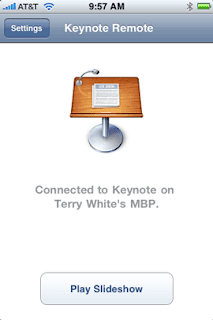
highly rated app direct from Apple is the consummate crowd pleaser. Averaging
between four and five stars consistently, Keynote allows users to create
impressive presentations directly on their smart phones. Usable on both iPhones
and iPads, Keynote users can create top of the line visual presentations with
everything from pie charts to 3D graphics. With Apple’s famous touch and tap
interface, Keynote users can even import and export their PowerPoint presentations
with this must-see app. While this app is priced slightly higher than a number
of other iPhone productivity apps, its high ratings make it well worth checking
out.
Dropbox App
Dropbox
is a must-use iPhone app for those wanting to make the most of their working
hours. Available in seven languages, Dropbox is optimized for iPhone 5. Users
can access documents, photos, and even videos from either their own computers
or from the Dropbox website. Cloud computing is incredibly easy with this app.
You will likely wonder how you ever lived without it once you download this
free app.

Evernote App
Evernote
is another highly rated iPhone app well worth checking out for improved
productivity. Users can do everything from create voice reminders, take
pictures, create daily to do lists, and even map their activities. While the
entry level Evernote is a free download, Evernote Business is available via a
monthly subscription rate. With Evernote Business, entire workforces can store
and access their work documents in the cloud.

Week Calendar App
Week
Calendar from UtiliTap is available in 20 languages for both iPhones and iPads,
including the iPhone 5. Users can easily see their weekly calendars at a glance
while synchronizing their daily duties. With the ability to duplicate duties,
color code events, and even share appointments, UtiliTap’s Week Calendar is
well worth checking out.
Organizer To Do App
The
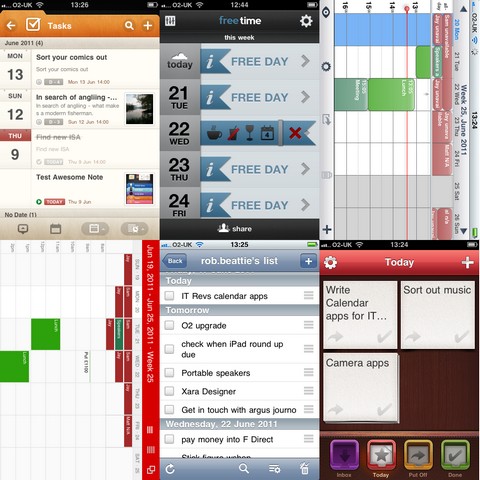
Organizer To Do app from Yadahome LLC is a personal planner useful for busy
moms on the go or businesspeople consistently in need of a little
organizational help. With productivity options like budgeting, calendar
scheduling, and even grocery listing capabilities, the Organizer To Do app is
likely to become an integral part of a busy day. Users can utilize iCloud Sync
to stay on top of their daily duties. If you consistently find yourself short
on time and long on duties, this Smartphone app might make your life a tad more
productive.
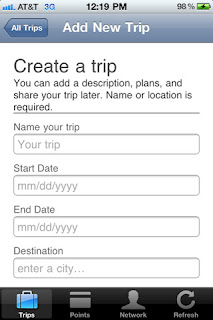
Check
out these productivity iPhone apps for yourself to see which ones will help you
to make the most of your working hours. By making use of the vast array of
tools at your disposal, you just might be able to check off becoming organized
from your New Year to do list.

There are many deals for all you buyers of the iphone, just go online and millions of pages pop up claiming to give you great deals on the latestiphone. Turn on the television and every channel is filled with adverts of company’s claiming to have the best deal for you. But can you really trust those webpages and adverts that claim to have the original iPhones and have the best deals and in full working order?
To see that as here, I am providing full details (information) on iphones and a best web-site for iphones as this website contains all information, knowledge and the latest deals of all the latest iPhones, whether you are a first time buyer of iPhone and want to select the right iPhone for you, or if you a technology lover and you are looking for the latest deal on iPhones. If you shop around, you could bag yourself a bargain.
The iPhone 3GS was first brought out on the 9th of June 2008 after the original iPhone, it is the third version brought out by Apple.

The 320x480-pixel, 3.5-inch screen. It comes in 8GB, 16GB and 32GB. Pay as you go models will cost you about £290; you can obtain thousands of games and applications, download music and podcasts and sync your phone with your home music library via Apple's iTunes desktop application.
The iPhone3GS is certainly the cheapest at the moment, as it only three years old it is still very popular in the US. The iPhone ranges from around £25 to £30 a month.
The iPhone 4 was first released on the 24th of June 2010 it is the fourth version of the iPhone developed by apple, the iPhone 4 is pasifically marketed for video calling.

The screen measures 3.5 inches. The iPhone 4 is available from £38 to £50 a month.
The screen measures 3.5 inches. The iPhone 4 is available from £38 to £50 a month.
The iPhone 4S was first released on the 14th October 2011 and is the 5th addition to the iPhone. It was unveiled as the “let’s talk iPhone”

The iPhone 4S is the first phone switch between two antennas to transmit and receive, so call quality is better. It also doubles the maximum HSDPA data speeds to 14.4 Mbps. Which means faster connections, faster downloads, faster reloading. The iPhone 4S is available on contract ranging price from £41 to £50 a month.
All iPhones have available contracts from 12, 18 and 36 months.
All iPhones can have the following apps as-
AIRPRINT
Print your email, photos, web pages, and documents right from your iPhone over Wi-Fi.7 There’s no software to download, no drivers to install, and no cables to connect. With just a few taps, you can go from viewing something on the iPhone screen to holding a printed copy.
ICLOUD
iCloud stores your music, photos, apps, mail, contacts, calendars, documents, and more.
 VIDEO RECODING IN 1080p HD
Shoot stunning 1080p HD video everywhere you go. With all-new optics, the light is always right, the colour is always vivid, and you can edit video right on iPhone
SIRI
Your personal assistant on your iPhone talk to Siri as if you were talking to the person next to you, Siri not only understands what you say, it knows what you mean, where’s the nearest Chinese restaurant around here?, Siri will figure out the right app for you.Siri makes phone calls, sends messages, schedules meetings and sets reminders.
All iPhones are controlled by a user's fingertips on the multi-touch display, which is sensitive to fingertip contact.
The network providers for the iPhones are: Orange, 02, three, Vodafone,T-Mobile, Virgin, mobile and Talkmobile.


 Posts
Posts



