
Showing posts with label iphone apps. Show all posts
Showing posts with label iphone apps. Show all posts

Things to Watch for in the Event App Industry in 2018
Have you noticed the recent explosion in event apps? There is now a huge demand for ways for people to go from online to offline. From Yelp to Eventbrite to Meetup, many people are relying on their phones to discover interesting events and ways to enhance their experience at the event. Here are 5 things to watch for that are currently developing in the event app industry.
1. Building Brand Loyalty
As of 2013, there’s more competition than ever to make sure that your users trust you. There are already established events apps players in the industry, but there’s always room for more niche event apps. For example, an app focused on finding venues for musicians will have a much easier time building a loyal following in the music space. Similarly, tech entrepreneurs will have a different focus for their networking needs, and if your app is the authority, it will be easier to build up the brand loyalty that will keep paying you dividends down the road.
2. Gamifying the Experience
Another trend that is happening is how apps are making the mundane fun. You could reward desired behavior with a points system and encourage new event attendees and consistent attendees with badges and other rewards for recognition. If you make the game fun for users, they will keep coming back again and again.
3. Integrating Monetization
Your users are willing to pay to go to worthwhile events, and naturally if your app consistently helps your users discover great events, you can and should charge. Depending on how many events your app is able to curate and how much your user space is willing to contribute to be in the know about these events, you would be able to charge a percentage off of the event as in the case of Eventbrite.
4. Going Green
One of the top advantages that mobile apps have is that they are good for the Earth. Instead of having to fumble and search for a paper ticket, with a mobile app, you reduce the need to print for your customers and help the environment by eliminating a paper trail. By eliminating paper tickets, you can also speed up the check in process and make your users’ first interaction with your app a seamless and pleasant experience.
5. Increasing Engagement
More so than any other niche in the app industry, event apps serve the need to feel connected. What would be more connected than being updated by something that is constantly with you--your phone? It is important to have regular push notifications and reminders for your users before the event.
There has been an explosion in the mobile app development space, and event apps are no exception. As of 2013, the space is maturing. Many event apps are building brand loyalty, gamifying the experience, integrating monetization, going green, and increasing engagement. Will your app take advantage of these trends?

Health and safety should always be treated as a priority in the
workplace. A typical office environment has dozens of potential hazards and
health concerns. Of course, while all employees should be aware of these
dangers, teaching health and safety is not an easy task. It can be difficult to
maintain staff attention with boring, procedural materials, so many employers
are turning to technology to keep their staff engaged with the subject. There
are many iPhone apps that are dedicated to safety in the workplace, and they
can provide interesting tips and reminders about proper procedures and
regulations.
Safety Snaps
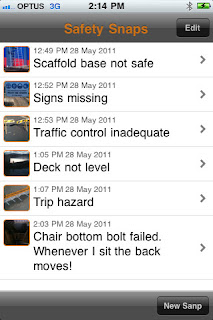
Many workplaces are full of potential hazards that are ignored for
so long they become part of the scenery. Employees eventually get used to
stepping over that wire in the conference room or skipping the dodgy step on
the staircase. The SafetySnaps app is an effective way for employees to
document these workplace dangers so they can be dealt with quickly. Whether
it's a trip hazard or a wonky bannister, the app lets users take a photo of any
hazards and add a description and the location. The photo and the information
can then be emailed to bring attention to the relevant person and can serve as
a reminder to notify other employees in the meantime.
iAuditor
 Don't let the dreary name fool you, the iAuditor app is a powerful
and effective tool for performing workplace inspections and hazard checks. The
app has several different templates, from construction sites to general office
inspections, which contain questions relevant to that workplace. Employees can
go through the check-list, which has simple questions about the ventilation,
lighting and noise levels, to perform a safety audit and see what changes can
be made to benefit the workplace.
Don't let the dreary name fool you, the iAuditor app is a powerful
and effective tool for performing workplace inspections and hazard checks. The
app has several different templates, from construction sites to general office
inspections, which contain questions relevant to that workplace. Employees can
go through the check-list, which has simple questions about the ventilation,
lighting and noise levels, to perform a safety audit and see what changes can
be made to benefit the workplace.
FireSafety
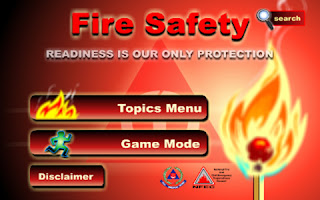
The importance of fire safety is often overlooked in the
workplace, and telling staff where the safety exits and assembly points are in
case of emergency is often the extent of fire training. Even practising regular
fire drills can be insufficient as staff still won't know what to do if they
become trapped in a room or if one of the exits is blocked. The FireSafety app
offers an exhaustive guide to the dangers of fire, and it provides valuable
advice about what to do in case of an emergency and how to identify early
warning signs.
First Aid
By British Red Cross
Although most offices have a designated first aid person, more and
more workplaces are offering first aid courses to all members of staff.
The British Red Cross app provides simple step-by-step advice, as well as
accompanying instructional videos, about what to do in case of emergency. Many
people think that offices are safe places of work, but the likes of asthma
attacks, diabetic emergencies and even heart attacks can strike anywhere and at
any time. The app instructs employees about how then can spring into action in
the early signs of a health emergency, and the information could potentially
save someone's life.

SCDF Fire
Safety
 As well as offering preventative advice about fire safety and what
to do in an emergency, the SCDF Fire Safety app also has information about how
to operate a fire extinguisher, manual call point and fire blanket. The office
kitchen can be a hazardous place, and even a small hob or electrical fire can
turn into something much worse. Although employees should always consider their
personal protection before dealing with a fire, this informative app can
prepare employees for such hazards and teach them how to stop a small fire from
escalating.
As well as offering preventative advice about fire safety and what
to do in an emergency, the SCDF Fire Safety app also has information about how
to operate a fire extinguisher, manual call point and fire blanket. The office
kitchen can be a hazardous place, and even a small hob or electrical fire can
turn into something much worse. Although employees should always consider their
personal protection before dealing with a fire, this informative app can
prepare employees for such hazards and teach them how to stop a small fire from
escalating.
These apps can be a real eye-opener to the potential dangers that
can occur in the workplace, and they can make all employees think about
preventing hazards and how to respond to accidents and emergencies. However,
extensive, qualified training courses are still the best source of information
for employees, and the apps should not be used in lieu of them. The technology
is best suited as 'top-up' lessons that can refresh employee's memory about
health and safety practices in the workplace.
The smart devices have
become an essential part of our daily lives. These devices have made our lives
easy and the credit solely goes to the applications which one can easily
download to these devices. The ways we are able to use of these applications
are the key and make the work easy for us. These are best at the of traveling.
These applications have
found their way into making our professional as well as personal lives easier.
The iPhone was the iconic device which changed the world of smart phones. Now
millions of apps are available on the market which one can download free as
well as for some nominal charges. Here are some of the most popular apps for
your iPhone. I hope you will like these top five best iPhone apps -
Adrian James Boot Camp App

If your waist line is
growing faster than you and if you are finding it difficult to find out workout
ideas then this is the ultimate app which will guide you to a fitter and
healthier you without any costly gym equipments. The demonstrated upper as well
as lower body workout can be your fitness guide and coach you to a healthier
tomorrow. Now it even has a diet planner.
Stay App

Are you a constant
traveler? If yes, then here is the app which will be your ultimate travel guide
and assist you at each step. Here you can upload your experiences which will
help in guiding others. You can contact your friends and come to know where all
they have been and how their experience was. The city tour maps and guides can
be easily downloaded to your phone and so all you have to do is just move
around, travel, upload and download.
Crash Bandicoot Nitro Kart 2 App

Who doesn’t like to be
entertained by games? If your mornings are quite boring and you have to go
through an hour long journey then this is the app which will make you wait
impatiently for that one hour. All you have to do in this action-packed game is
to beat your fellow travelers in reaching the destination by crossing the
obstacles. It is not as easy as it looks.
Gettaxi App

Suppose you are standing
waiting for a taxi with you iPhone and find out that each of the passing taxi
cars are either ferrying or not going stopping for you are you just going to
wait? Not anymore as the Gettaxi app is made to solve this very problem for
you. Now you can even get a profile of the driver of the car which has pulled
over.
Instagram App

Now which blogger or
writer hasn’t made us of this app? It is one of the best apps for adding
effects to your photos. Editing photos and uploading them were never this easy.

If
one of your New Year’s resolutions is to use your time more wisely, a
productivity app might be just what you need to kick start your year. Here we look at some great apps to increase your productivity on the iPhone! There are
a number of apps you can consider, but often a leading indicator of quality is
high ratings from other users like yourself. Whether you are a businessperson
hoping to make better use of your work hours or a stay at home mom trying to
juggle numerous schedules, following are five top-rated iPhone apps you can
peruse. iPhone deals are fantastic for great apps and these are 5 of the best.
Keynote App
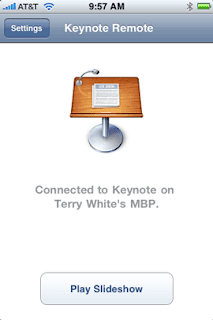
This
highly rated app direct from Apple is the consummate crowd pleaser. Averaging
between four and five stars consistently, Keynote allows users to create
impressive presentations directly on their smart phones. Usable on both iPhones
and iPads, Keynote users can create top of the line visual presentations with
everything from pie charts to 3D graphics. With Apple’s famous touch and tap
interface, Keynote users can even import and export their PowerPoint presentations
with this must-see app. While this app is priced slightly higher than a number
of other iPhone productivity apps, its high ratings make it well worth checking
out.
Dropbox App
Dropbox
is a must-use iPhone app for those wanting to make the most of their working
hours. Available in seven languages, Dropbox is optimized for iPhone 5. Users
can access documents, photos, and even videos from either their own computers
or from the Dropbox website. Cloud computing is incredibly easy with this app.
You will likely wonder how you ever lived without it once you download this
free app.

Evernote App
Evernote
is another highly rated iPhone app well worth checking out for improved
productivity. Users can do everything from create voice reminders, take
pictures, create daily to do lists, and even map their activities. While the
entry level Evernote is a free download, Evernote Business is available via a
monthly subscription rate. With Evernote Business, entire workforces can store
and access their work documents in the cloud.

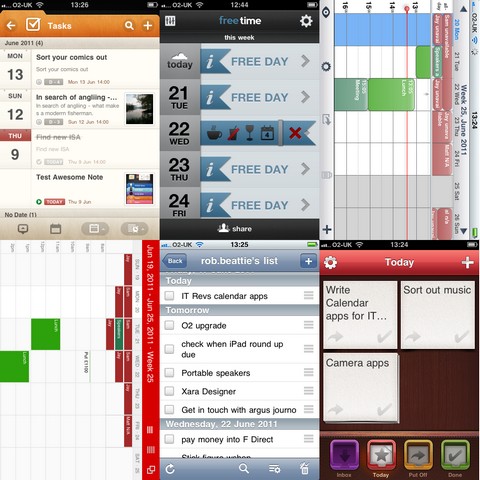
Week Calendar App
Week
Calendar from UtiliTap is available in 20 languages for both iPhones and iPads,
including the iPhone 5. Users can easily see their weekly calendars at a glance
while synchronizing their daily duties. With the ability to duplicate duties,
color code events, and even share appointments, UtiliTap’s Week Calendar is
well worth checking out.
Organizer To Do App
The
Organizer To Do app from Yadahome LLC is a personal planner useful for busy
moms on the go or businesspeople consistently in need of a little
organizational help. With productivity options like budgeting, calendar
scheduling, and even grocery listing capabilities, the Organizer To Do app is
likely to become an integral part of a busy day. Users can utilize iCloud Sync
to stay on top of their daily duties. If you consistently find yourself short
on time and long on duties, this Smartphone app might make your life a tad more
productive.
Check
out these productivity iPhone apps for yourself to see which ones will help you
to make the most of your working hours. By making use of the vast array of
tools at your disposal, you just might be able to check off becoming organized
from your New Year to do list.


 Posts
Posts



