
Showing posts with label iPhone. Show all posts
Showing posts with label iPhone. Show all posts
It used to be the case that
you had to buy mobile phones outright in order to benefit from the
functionality. Nowadays, mobile operators offer many ways to buy handsets and
get a monthly allowances of air time and data. These broadly fit into the
following categories: monthly contracts, pay-as-you-go, SIM free, and contract
SIMs. It can be very costly buying several phones on contract, here we look at
the 4 main ways to buy phones and air time needed for different types of user.
Monthly contracts
Monthly
contracts provide buyers with the opportunity to save money. Buyers can spread
the cost of the purchase of the handset and receive excellent value airtime,
data allowance, and text messages in return for a commitment to a monthly
contract. These contracts tend to nowadays be 24 months, although it is
possible to get contracts of 18 and 12 months.
A
mobile operator will normally credit check the buyer and decide whether they
are worthy of the phone they are looking for. Handsets are a significant
purchase of often £400 or more. Contracts of 24 months sometimes weigh in at
£800 or more. Therefore, the operators will want to now that the buyer is a
responsible borrower.
There
are specific types of contracts that are designed to different types of users,
from light users, medium users, heavy users, and even business users. Orange,
Tesco and T Mobile offers change almost daily and it is essential to check
current offers.
Pay As You Go
Pay
as you go phones provide buyers with the opportunity to buy a phone that is
locked to a certain provider. They will buy air time with the phone, and then
top up as they need credit through the purchase of vouchers, or by registering
their credit or debit card to the phone.
Most
of the best phones are offered on pay as you go, and these range from £15 to
hundreds of pounds. When people are looking to buy on pay-as-you-go, they are
more conscious of the price of the phone than when buying through a contract.
With contracts, the difference between phones is normally a few pounds a month.
When paying up front for a phone, the difference between £150 and £400 is more
compelling and immediate.
SIM free phones
It is
possible to buy phones that are not locked to a network and can be used with
any sim card. These are often more expensive than pay as you go phones, but
provide the opportunity to choose your network and move between networks if you
choose. These unlocked phones are available through many high street shops, and
also online retail stores.
Contract SIMs
A new
innovation in the mobile phone market over recent years has been the
availability of sim card contracts. These provide affordable allowances of
talk, data, and texts in a stand-alone sim. The buyer will not get a phone with
the purchase, but will put the sim card into an unlocked sim free phone of
their choice. The great thing about these sim contracts is they give access to
cheap calls and data without such stringent credit requirements. After all, the
operator does not have to part with an expensive product in the form of a
premium high end phone.
In Summary
In
summary, the 4 main ways to buy phones and air time are suited to different
types of user. You should always be mindful of your budget and not get tempted
into a phone and contract above your financial capacity. It is a dangerous trap
when a household starts buying several phones on contract. It is easy to end up
with outgoings of well over £150 a month and commitments of up 24 months.

Signing
a contract tends to mean that you get a hand set for a cheap up front price,
which is great. However, you will be paying for that phone with monthly installments
on your phone bill, and over the course of a two year contract those installments
can add up to far more than the actual cost of the phone. Even though you will
have to pay more money up front, you can end up saving money by finding the
best pay as you go tariff that you can.
 This
means that you'll be paying the actual cost of the phone, and then paying only
for the calling minutes, text messages and data that you actually use. So we've
found you the best pay as you go tariffs around at the moment. And not only
that, but all these plans come in at under £500, which is cheaper than the
price of the unlocked hand set, so they really are great deals. A cheaper alternative to paying over £500 for a high-end handset is the PAYG route. Here we bring the four latest PAYG deals from the main providers. These
This
means that you'll be paying the actual cost of the phone, and then paying only
for the calling minutes, text messages and data that you actually use. So we've
found you the best pay as you go tariffs around at the moment. And not only
that, but all these plans come in at under £500, which is cheaper than the
price of the unlocked hand set, so they really are great deals. A cheaper alternative to paying over £500 for a high-end handset is the PAYG route. Here we bring the four latest PAYG deals from the main providers. These
Top Four Best PAYG Tariffs are -
O2
At O2
five hundred pounds gets you the phone (obviously) as well as a tenner in
credit as part of the O2 Pay and Go Go Go programme. For ten pounds credit
you'll get 75 calling minutes, 500 text messages and 100 MB of data usage.
Plus, by signing up for the O2 Rewards programme you can reap several benefits
too, including getting ten per cent of your top ups back every three months.
Vodafone
 Vodafone's
Freedom Pay as You Go plan gets you the phone and a ten pound top up for five
hundred pounds. With that tenner credit you get 100 calling minutes, 300 text
messages and 50 MB of data usage. You can also choose one of a variety of
benefits, including Vodafone Top Up which gives you 1000 free calling minutes
to other Vodafone numbers, or Passport which lets you take your UK price plan
abroad with you when you go on holiday.
Vodafone's
Freedom Pay as You Go plan gets you the phone and a ten pound top up for five
hundred pounds. With that tenner credit you get 100 calling minutes, 300 text
messages and 50 MB of data usage. You can also choose one of a variety of
benefits, including Vodafone Top Up which gives you 1000 free calling minutes
to other Vodafone numbers, or Passport which lets you take your UK price plan
abroad with you when you go on holiday.
Three
 With
Three Pay as You Go you get the phone and £15 of credit for your five hundred
pounds. That includes 300 calling minutes, 3000 texts messages and unlimited
data usage. Plus, there's international calling from 2p a minute, 150 MB of
free internet every top up and an extra tenner of credit the first time you top
up your phone. This is definitely the sweetest deal for heavy phone users.
With
Three Pay as You Go you get the phone and £15 of credit for your five hundred
pounds. That includes 300 calling minutes, 3000 texts messages and unlimited
data usage. Plus, there's international calling from 2p a minute, 150 MB of
free internet every top up and an extra tenner of credit the first time you top
up your phone. This is definitely the sweetest deal for heavy phone users.
 T-Mobile
T-Mobile's
pay as you go is a little more flexible. For your five hundred pounds you get
the hand set plus your choice of 60 international calling minutes, 100 UK
calling minutes or unlimited texting. For an extra fiver you get unlimited data
usage too.

Mobile phones are a necessity
for most people these days. Having several features, these gadgets can help to
keep us busy and organised while dealing with our day to day activities. People
like to have a smartphone that a wide range of features and there are many to
choose from that can meet their requirements and necessities.
There
are many people who like to customise their phones in order to enjoy better
features and applications. It is also necessary to accessorise the phone in
order to enjoy all the features and applications it offers. Mobile phones are
getting more advanced with every new release. They come with better features
and offer the users an increasing amount of apps to have more fun. You can
customise your phone quite easily and can change its colour, or add flashing
accessories to make it personal to you.
Customisation Options
Customisation
allows a person to make his or her phone unique. For customising, users can
easily find numerous options on the internet. You can get loads of wallpapers,
ringtones and others, all of which are easily downloadable from the internet
which can make your phone more personal to you.
Cases
You
can get colourful cases for your mobile phone to give it a new look. Changing a
case only makes your phone appearance better; it can also protect your phone
from light showers, dirt and dust and is added protection in case you drop the
handset. There are several websites from where you can find a suitable case at
bargain prices.
Wallpaper
Apart
from this, you can also set your favourite picture as your front screen to make
your phone unique. Wallpaper set by you also tells a lot about your
personality. It may be a picture of your favourite singer or of your favourite
football team but it all makes the handset unique to you.
There
are some phones that allow you to put a banner. Using this facility, you can
write something silly or funny to express yourself in a different way.
Beads and Bling
You
can also stick a trendy keychain to the casing to provide a new look. Girls out
there can make strings of beads and decorate their phone to flaunt in front of
their friends.
Software
Users
can also add custom peripherals or can modify the existing software in their
phone for making its performance better.
You
can upgrade your mobile this way when it gets outdated. If you are using a
smartphone, you can customise it and can switch on to a new browser supported
by your phone. This way you can experience faster Internet surfing than ever
before without the need to upgrade.
Ringtones

Mobile
phone users can do a lot to provide a better look to their phones both inside
and outside. They can make their contact list easier to navigate by adding
personalised ringtones and custom photographs.
You
can also customise the audio settings of your phone in order to improve its
audio quality. Android users can use the Equalizer application for doing this.
So, how will you start?
Customisation
is always fun and you can do it without putting in much effort, the majority of
it is done over time as favourite songs change and new photos are taken. So,
just go for it, change the case of your phone, upload some new wallpaper, or
upgrade the applications. All these changes will offer you a new kind of
satisfaction and will make your device work better than ever before.

While we are at home or in the office, the wireless networks which
we use are likely to be secured, preventing anyone who is within reach of the
wireless signal from being able to access our network by the use of password
protection.
Unsecure network
But by the very nature of wireless networks, they are designed to
provide free or at least easily metered access to the network, which in turn
means that the user doesn't need to use a router or all the other paraphernalia
which we often associate with being able to get onto the internet in our usual
surroundings.
Wireless networks themselves are usually secure, in that in order
to use them, people need to enter a password which then enables their computer,
smartphone or tablet to link to the network, and do everything they usually
expect to be able to do online on their devices.
Secure network
However, having a secure wireless network over which you can
access the internet does not mean that you can afford to neglect using all the
other forms of online security which you're accustomed to.
Public Wi-Fi networks have, sadly become associated with a degree
of risk, and not helped by scare stories such as those caused by the Google
Maps camera teams, whose computers were able to intercept data being passed via
wireless computer networks.
Encryption
In order to prevent the data which you both send and receive via a
wireless network from being read by others nearby, you therefore need to ensure
that the connection between whatever device you're using at the network is
encrypted by the use of a private key – similar to a password enabling access
to it.
Well-known commercial hotspot providers may insist that you obtain
a key from them to access the networks, which gives some guarantee that at
least they know who is likely to be accessing their network.
VPN's
A more secure solution, particularly useful when a businessperson
wants to access their company's own network, is what's known as a virtual
private network, or VPN. Such connections can create a secure link between any
two points on the internet, and are becoming increasingly popular for companies
whose staff needs to be able to access their networks while out and about.

Don't be lazy about security
We can easily become blasé when we're using an internet connection
in the security of our work or home environments. But if we want to stay safe
while doing the same as we roam around, we need to be sure that our
communications can't be pried on, as far as possible. It sounds simple, but we
should always bear in mind that the overriding principle of the internet is
that it's open and accessible to all. You should therefore be sure that your
own access cannot be compromised by anyone else.

Getting an iPhone has never
been easier, or cheaper for that matter. But an iPhone is still a pretty big
investment. The initial cost of the hand set is one thing, but when you add in
the monthly contract costs, you could end up spending an awful lot more money
than you really should be. It is worth considering the older pay as you go
(PAYG) model when looking at iPhones, because you could well save money,
particularly if you're not a big phone user, per se, preferring instead to use
your device for messaging of internet capabilities. iPhone PAYG can be a great
way of getting the phone that you really want, whilst not paying an awful lot
of money to get it. Don't believe us? Then check out the figures...
iPhone Contracts...
Note:
these prices are averages, and will depend on your location and any special
deals that mobile service providers may be offering.
One
of the best iPhone contract deals for the 4S right now is with Tesco Mobile.
The initial upfront costs will be around £335 for the phone itself. You're then
locked into a fairly short twelve month contract (the standard contract length
nowadays is twenty four months), at around £25 per month. You do get some
freebies, including 1GB of internet usage, 250 calling minutes and 500 SMS. The
total price of this contract works out to be around £635 (the price of the hand
set plus the monthly bill for twelve months).
For
those of us who don't want to shell out any cash up front, there is another
possibility, but it involves being locked into a much longer contract. The UK
mobile service provider 3 will give you an iPhone 4S for gratis, but you have
to sign a twenty four month contract at £35 per month. For this you get the
phone, 1 GB of internet usage, 500 calling minutes and unlimited SMS. But the
total cost of this contract ends up to be a whopping £840.
iPhone PAYG...

The
caveat for an iPhone PAYG plan is that you need to regularly top up your
account. By putting money into your account often enough you will qualify for
unlimited data usage with most mobile providers. You will, of course, also need
to buy the hand set yourself. Buying the iPhone 4S direct from Apple (which is
cheaper and will avoid any unlocking issues), will set you back around £499.
Going with the provider GiffGaff is your best deal. Putting at least £10 of
credit per month onto your phone will qualify you for unlimited data and SMS as
well as 250 calling minutes. Doing this for a year has a total cost of £619.
Which is Best?
PAYG
obviously works out cheaper in the long run, but you do have to be willing to
make the initial investment. If you can spend the cash right now on an iPhone
though, you do end up saving money by not having to sign a contract. There's no
reason that you should be locked into paying the phone company, when you could
be putting that money back into your own pocket...
Health and safety should always be treated as a priority in the
workplace. A typical office environment has dozens of potential hazards and
health concerns. Of course, while all employees should be aware of these
dangers, teaching health and safety is not an easy task. It can be difficult to
maintain staff attention with boring, procedural materials, so many employers
are turning to technology to keep their staff engaged with the subject. There
are many iPhone apps that are dedicated to safety in the workplace, and they
can provide interesting tips and reminders about proper procedures and
regulations.
Safety Snaps
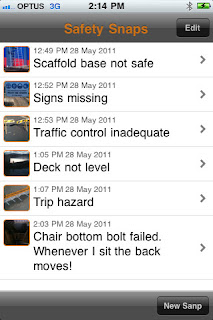
Many workplaces are full of potential hazards that are ignored for
so long they become part of the scenery. Employees eventually get used to
stepping over that wire in the conference room or skipping the dodgy step on
the staircase. The SafetySnaps app is an effective way for employees to
document these workplace dangers so they can be dealt with quickly. Whether
it's a trip hazard or a wonky bannister, the app lets users take a photo of any
hazards and add a description and the location. The photo and the information
can then be emailed to bring attention to the relevant person and can serve as
a reminder to notify other employees in the meantime.
iAuditor
 Don't let the dreary name fool you, the iAuditor app is a powerful
and effective tool for performing workplace inspections and hazard checks. The
app has several different templates, from construction sites to general office
inspections, which contain questions relevant to that workplace. Employees can
go through the check-list, which has simple questions about the ventilation,
lighting and noise levels, to perform a safety audit and see what changes can
be made to benefit the workplace.
Don't let the dreary name fool you, the iAuditor app is a powerful
and effective tool for performing workplace inspections and hazard checks. The
app has several different templates, from construction sites to general office
inspections, which contain questions relevant to that workplace. Employees can
go through the check-list, which has simple questions about the ventilation,
lighting and noise levels, to perform a safety audit and see what changes can
be made to benefit the workplace.
FireSafety
The importance of fire safety is often overlooked in the
workplace, and telling staff where the safety exits and assembly points are in
case of emergency is often the extent of fire training. Even practising regular
fire drills can be insufficient as staff still won't know what to do if they
become trapped in a room or if one of the exits is blocked. The FireSafety app
offers an exhaustive guide to the dangers of fire, and it provides valuable
advice about what to do in case of an emergency and how to identify early
warning signs.

First Aid
By British Red Cross
Although most offices have a designated first aid person, more and
more workplaces are offering first aid courses to all members of staff.
The British Red Cross app provides simple step-by-step advice, as well as
accompanying instructional videos, about what to do in case of emergency. Many
people think that offices are safe places of work, but the likes of asthma
attacks, diabetic emergencies and even heart attacks can strike anywhere and at
any time. The app instructs employees about how then can spring into action in
the early signs of a health emergency, and the information could potentially
save someone's life.

SCDF Fire
Safety
 As well as offering preventative advice about fire safety and what
to do in an emergency, the SCDF Fire Safety app also has information about how
to operate a fire extinguisher, manual call point and fire blanket. The office
kitchen can be a hazardous place, and even a small hob or electrical fire can
turn into something much worse. Although employees should always consider their
personal protection before dealing with a fire, this informative app can
prepare employees for such hazards and teach them how to stop a small fire from
escalating.
As well as offering preventative advice about fire safety and what
to do in an emergency, the SCDF Fire Safety app also has information about how
to operate a fire extinguisher, manual call point and fire blanket. The office
kitchen can be a hazardous place, and even a small hob or electrical fire can
turn into something much worse. Although employees should always consider their
personal protection before dealing with a fire, this informative app can
prepare employees for such hazards and teach them how to stop a small fire from
escalating.
These apps can be a real eye-opener to the potential dangers that
can occur in the workplace, and they can make all employees think about
preventing hazards and how to respond to accidents and emergencies. However,
extensive, qualified training courses are still the best source of information
for employees, and the apps should not be used in lieu of them. The technology
is best suited as 'top-up' lessons that can refresh employee's memory about
health and safety practices in the workplace.

There are many deals for all you buyers of the iphone, just go online and millions of pages pop up claiming to give you great deals on the latestiphone. Turn on the television and every channel is filled with adverts of company’s claiming to have the best deal for you. But can you really trust those webpages and adverts that claim to have the original iPhones and have the best deals and in full working order?
To see that as here, I am providing full details (information) on iphones and a best web-site for iphones as this website contains all information, knowledge and the latest deals of all the latest iPhones, whether you are a first time buyer of iPhone and want to select the right iPhone for you, or if you a technology lover and you are looking for the latest deal on iPhones. If you shop around, you could bag yourself a bargain.
The iPhone 3GS was first brought out on the 9th of June 2008 after the original iPhone, it is the third version brought out by Apple.

The 320x480-pixel, 3.5-inch screen. It comes in 8GB, 16GB and 32GB. Pay as you go models will cost you about £290; you can obtain thousands of games and applications, download music and podcasts and sync your phone with your home music library via Apple's iTunes desktop application.
The iPhone3GS is certainly the cheapest at the moment, as it only three years old it is still very popular in the US. The iPhone ranges from around £25 to £30 a month.
The iPhone 4 was first released on the 24th of June 2010 it is the fourth version of the iPhone developed by apple, the iPhone 4 is pasifically marketed for video calling.

The screen measures 3.5 inches. The iPhone 4 is available from £38 to £50 a month.
The screen measures 3.5 inches. The iPhone 4 is available from £38 to £50 a month.
The iPhone 4S was first released on the 14th October 2011 and is the 5th addition to the iPhone. It was unveiled as the “let’s talk iPhone”

The iPhone 4S is the first phone switch between two antennas to transmit and receive, so call quality is better. It also doubles the maximum HSDPA data speeds to 14.4 Mbps. Which means faster connections, faster downloads, faster reloading. The iPhone 4S is available on contract ranging price from £41 to £50 a month.
All iPhones have available contracts from 12, 18 and 36 months.
All iPhones can have the following apps as-
AIRPRINT
Print your email, photos, web pages, and documents right from your iPhone over Wi-Fi.7 There’s no software to download, no drivers to install, and no cables to connect. With just a few taps, you can go from viewing something on the iPhone screen to holding a printed copy.
ICLOUD
iCloud stores your music, photos, apps, mail, contacts, calendars, documents, and more.
 VIDEO RECODING IN 1080p HD
Shoot stunning 1080p HD video everywhere you go. With all-new optics, the light is always right, the colour is always vivid, and you can edit video right on iPhone
SIRI
Your personal assistant on your iPhone talk to Siri as if you were talking to the person next to you, Siri not only understands what you say, it knows what you mean, where’s the nearest Chinese restaurant around here?, Siri will figure out the right app for you.Siri makes phone calls, sends messages, schedules meetings and sets reminders.
All iPhones are controlled by a user's fingertips on the multi-touch display, which is sensitive to fingertip contact.
The network providers for the iPhones are: Orange, 02, three, Vodafone,T-Mobile, Virgin, mobile and Talkmobile.


 Posts
Posts



